

Databases
A database in Geass is a resource that belongs to one project environment. Geass runs it on your servers, creates its login, and publishes a connection string that your apps read from a Secret. You can run PostgreSQL, MySQL, Redis or SQLite in the cluster, connect an app to a database you already host elsewhere, such as AWS RDS, or have Geass create a database in your PlanetScale organization.
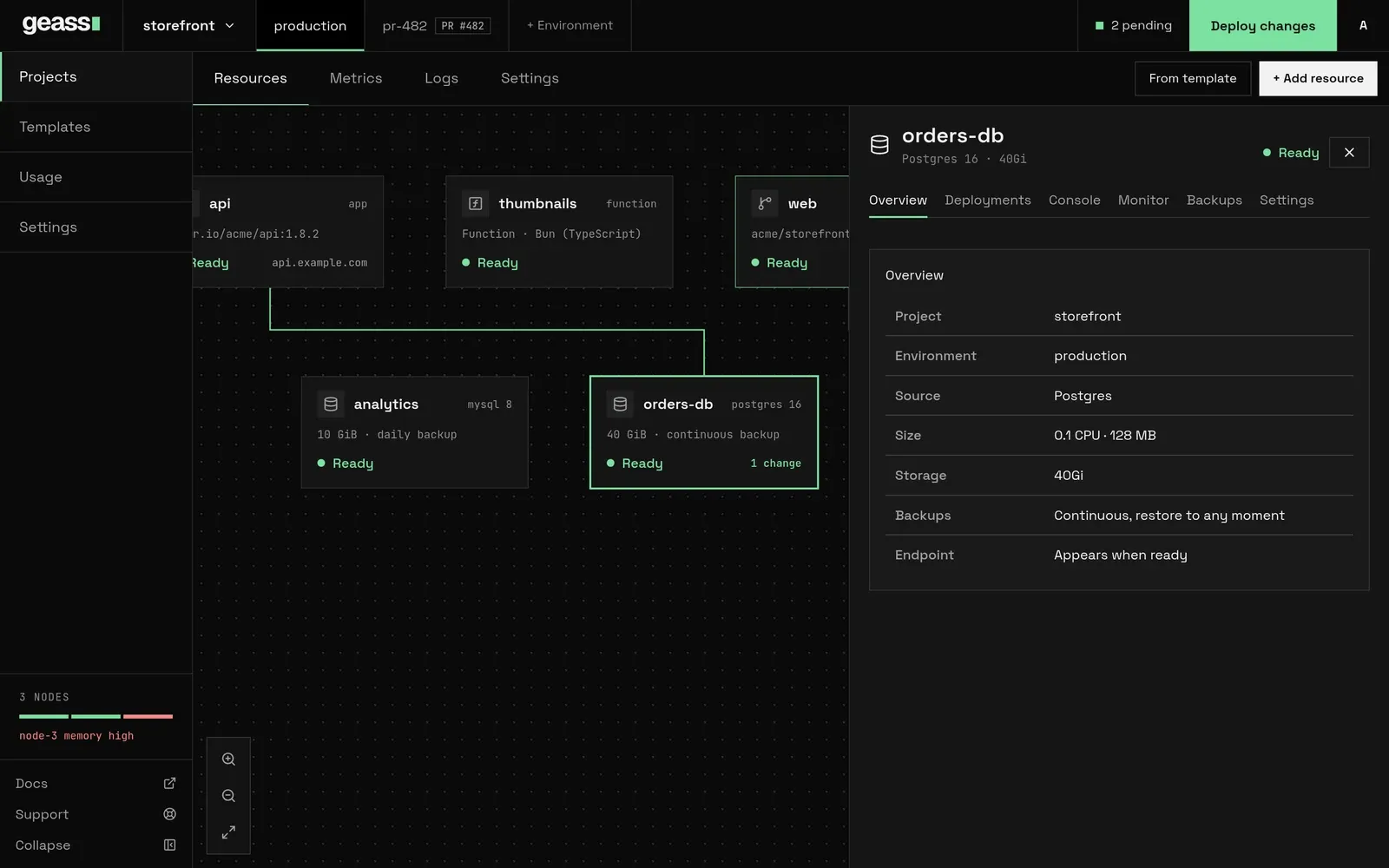 Screenshot with example data.
This page covers one database per resource. To share a single server between many projects, see Shared database servers. For backups, see Backups and restore. For how disks work, see Storage and volumes. To keep a project’s data on nodes you choose, see Where a database runs. To list databases and read how to connect from a terminal or an AI agent, see Command line and AI agents.
Before you start
Section titled “Before you start”- You need a project and an environment. See Projects and environments.
- The cluster needs room for the database. Deploying is refused when no node can fit it. If the project requires node tags, the room has to be on nodes that carry them. See Where a database runs.
- The first PostgreSQL database on a cluster installs the CloudNativePG operator, which takes a few minutes.
- For backups, the project needs an AWS connection. To have Geass create a PlanetScale database, it needs a PlanetScale connection. Connecting to an external database you already host needs no connection. See Cloud connectors.
- For resizable disks, the cluster needs the Longhorn add-on. See Storage and volumes.
Engines
Section titled “Engines”| Engine | What runs | Default size per instance | Disk | Backups |
|---|---|---|---|---|
| PostgreSQL | A CloudNativePG cluster using the image ghcr.io/cloudnative-pg/postgresql:<version>. Version 16 by default |
0.25 CPU, 512 MB | 10 GiB | Continuous, restore to any moment |
| MySQL | The Bitnami MySQL Helm chart, version 12.3.3 | 0.25 CPU, 512 MB | 10 GiB | Daily copy |
| Redis | The Bitnami Redis Helm chart, version 20.7.1, with persistence off | 0.25 CPU, 512 MB | None | None |
| SQLite | rqlite 8.36.16, which serves SQLite over HTTP on port 4001 | 0.1 CPU, 128 MB | 1 GiB | Daily copy |
Things to know about each engine:
- PostgreSQL is the only engine that uses the Version field, although the dashboard shows the field for every database. It is the tag of the Postgres image, with no checking, so use a tag that exists. Geass does not migrate data between major versions. Choose the version before the first deploy.
- MySQL and Redis versions come from the pinned Helm charts. The Version field has no effect on them.
- Redis keeps its data in memory. It has no disk, no size setting and no backups. A restart empties it, so use it as a cache.
- SQLite runs as rqlite, one instance on one volume. Apps talk to it over HTTP at port 4001, not by opening a file. It has no login: the connection string is a plain
http://address. - CPU and memory are one setting. The limit equals the request, so a database never bursts beyond what it reserved. Choose CPU from 0.1, 0.25, 0.5, 1 or 2, and memory from 128 MB, 256 MB, 512 MB, 1 GB, 2 GB or 4 GB.
Create a database
Section titled “Create a database”- Open the project and environment. Select + Add resource, then Database.
- Choose PostgreSQL, MySQL, Redis or SQLite. Geass saves a draft and opens its Settings. The dashboard says “Database saved as a draft. Configure it in settings, then deploy.”
- In Database, set the Version (only PostgreSQL uses it), CPU and Memory under Resources, and the Size under Storage. In Backups, review the defaults. In Scale, choose Run on if your nodes have tags. A database keeps its data on the nodes it is first deployed to, so this choice closes at the first deploy. If the project requires compliance tags, you do not choose them here: Geass adds them. See Scaling and placement and Where a database runs.
- Select Save changes. Every Save changes button on the page saves all values on it.
- Select Deploy changes in the project’s top bar. The N pending button beside it lists what will be deployed.
The status moves from Draft to Setting up and then Ready. Unavailable or Failed means something stopped it: see Troubleshooting. The Deployments tab shows each attempt and its errors.
A new database starts with these values:
| Setting | Default |
|---|---|
| Name | A generated two-word resource ID such as falling-mist |
| Database name | The resource ID. For PostgreSQL and MySQL this is the database inside the server |
| Login | app |
| CPU and memory | 0.25 CPU and 512 MB (SQLite: 0.1 CPU and 128 MB) |
| Disk | 10 GiB (SQLite: 1 GiB, Redis: none) |
| Backups | On for PostgreSQL, MySQL and SQLite, kept 7 days. They protect nothing until the project has backup storage |
| Instances | 1 |
You can rename the database by editing its title. That changes the display name only. The resource ID, which you use in kubectl and the API, does not change.
Create a database with the REST API
Section titled “Create a database with the REST API”Use a workspace token with the admin role. Project tokens cannot create resources. See Users and tokens and the REST API reference. The request creates a draft, so deploy it afterwards.
curl -X POST https://geass.example.com/api/databases/create \  -H "Authorization: Bearer $GEASS_TOKEN" \  -H "Accept: application/json" \  --data-urlencode project=proj-1a2b3c4d \  --data-urlencode environment=production \  --data-urlencode name=orders \  --data-urlencode engine=Postgres \  --data-urlencode storageSize=20Gi \  --data-urlencode cpu=500m \  --data-urlencode memory=1Gi
curl -X POST https://geass.example.com/api/databases/orders/deploy \  -H "Authorization: Bearer $GEASS_TOKEN" \  -H "Accept: application/json"
Find the project’s ID in the address of its pages (/projects/proj-1a2b3c4d). The first reply is {"ok":true,"name":"orders","kind":"databases"}.
The versioned API does the same with JSON bodies: POST /api/v1/databases, PATCH /api/v1/databases/{name}, POST /api/v1/databases/{name}/deploy and DELETE /api/v1/databases/{name}. From a terminal, geass api calls them:
geass api POST /databases -d '{"project": "proj-1a2b3c4d", "environment": "production", "name": "orders", "engine": "Postgres", "storageSize": "20Gi"}'geass api POST /databases/orders/deployThe fields are the ones in Options. See the REST API reference and the command line.
The resource ID (name) must be unique in the cluster, because every database is an object in geass-system. Leave name out and Geass generates a two-word ID and returns it. cpu and memory take the sizes the dashboard offers: 100m, 250m, 500m, 1 or 2, and 128Mi, 256Mi, 512Mi, 1Gi, 2Gi or 4Gi. Send both: if you send only one, the other falls back to 100m or 128Mi, not to the engine’s default. A PostgreSQL, MySQL or SQLite database created this way starts with backups on and a 7-day retention whatever you send. Change that with backups and backupRetentionDays on POST /api/databases/<ID>/update, as described in Backups and restore.
Create a database with a manifest
Section titled “Create a database with a manifest”You can also apply a GeassDatabase in the geass-system namespace. An object created this way has no draft step and starts provisioning at once. Backups stay off unless you set spec.backup. Set spec.deploy.enabled to true as well. Without it the command line, the MCP server and the API list the database as draft even while it runs, and the dashboard still offers settings that close at the first deploy, such as Run on.
apiVersion: geass.geass.dev/v1alpha1kind: GeassDatabasemetadata: name: orders namespace: geass-systemspec: project: proj-1a2b3c4d environment: production engine: Postgres version: "16" storageSize: 20Gi resources: requests: cpu: 500m memory: 1Gi limits: cpu: 500m memory: 1Gi backup: enabled: true retentionDays: 14 deploy: enabled: truekubectl apply -f orders-db.yamlkubectl get geassdatabases -n geass-systemConnect an app to a database
Section titled “Connect an app to a database”When a database is ready, Geass writes a Secret named <resource ID>-connection in the environment’s namespace (<project ID>-<environment>).
| Key | Value |
|---|---|
host |
The in-cluster address of the database |
port |
5432 PostgreSQL, 3306 MySQL, 6379 Redis, 4001 SQLite |
database |
The database name |
username |
app |
password |
The password |
uri |
The complete connection string |
The addresses and strings look like this:
| Engine | Host | Connection string |
|---|---|---|
| PostgreSQL | <ID>-rw.<namespace>.svc |
postgresql://app:<password>@<host>:5432/<database> |
| MySQL | geass-mysql-<ID>.<namespace>.svc (-primary is added for high availability) |
mysql://app:<password>@<host>:3306/<database> |
| Redis | geass-redis-db-<ID>-master.<namespace>.svc |
redis://:<password>@<host>:6379 |
| SQLite | <ID>.<namespace>.svc |
http://<host>:4001 |
To give an app the connection string:
- Open the app and go to Variables.
- In the hint “Trying to connect a database?”, select Add Reference.
- In Add reference, choose the database under Resource. A database that is not ready is greyed out with “not ready”.
- Select Add reference. The dashboard says “Connection added. Deploy to apply it.”
- Deploy the app.
The reference adds a variable that reads the Secret’s uri key. The variable is DATABASE_URL, or REDIS_URL for Redis. The list contains databases and buckets from the same project and environment only. Adding a second database replaces the first under the same name, so an app can have one DATABASE_URL reference. For more than one, add the values as Secret variables yourself. See Environment variables.
The hint appears only while the environment has at least one database or bucket. It has a dismiss button, your browser remembers the dismissal, and once you dismiss it the dashboard offers no other entry point to Add Reference. The API still works: send kind=database and name=<resource ID> to POST /api/apps/<app ID>/attach. Either way the reference is a pending change to the app, so deploy the app afterwards.
The database’s address resolves only inside the cluster. To reach a Postgres database from your machine:
NS=proj-1a2b3c4d-productionkubectl port-forward -n "$NS" svc/orders-rw 5432:5432kubectl get secret orders-connection -n "$NS" -o jsonpath='{.data.uri}' | base64 -dThen replace the host in that string with localhost. To read the host, port, database and login without kubectl, see Command line and AI agents.
The database panel
Section titled “The database panel”Select a database on the project canvas to open its panel. The tabs are:
| Tab | What it shows |
|---|---|
| Overview | Project, environment, source (the engine), size (CPU and memory), storage, backups (“Continuous, restore to any moment”, “Daily copy” or “Off”) and the endpoint (the host) once it is ready |
| Deployments | The deploy attempts, with errors, newest first |
| Console | A query box. See Run a query |
| Monitor | CPU, memory, disk used, and network in and out. Needs the monitoring add-on. See Observability |
| Backups | Status, settings and restore. Present for PostgreSQL, MySQL and SQLite running in the cluster |
| Settings | The sections below |
Databases have no Variables tab. That tab belongs to services.
Settings has a Filter settings box (press /) and these sections:
| Section | Contents |
|---|---|
| General | The project, environment and the resource ID, with a copy button |
| Database | Version, Resources (CPU and memory) and Storage (Size). Resources and storage appear for in-cluster databases, and storage only for engines that have a disk |
| Backups | The same panel as the Backups tab |
| Scale | Resources again, and Run on if nodes have tags. In-cluster databases only |
| Delete database | Deletion. The section list beside the settings calls it Danger. See Delete a database |
Changes to version, size, CPU, memory and storage are pending until you deploy them. The resource’s card on the canvas shows the change, the top bar’s N pending button counts it, and Deploy changes applies it. Backup changes apply at once. Viewers see “Your viewer role can inspect this resource but cannot change it.”
If provisioning failed, a Retry button appears beside the status.
Run a query
Section titled “Run a query”The Console tab has a Query box, filled with SELECT 1, and a Run query button. Geass runs the text inside the database’s pod with the engine’s own client and shows the output. Only admins can run queries, and viewers see “Your viewer role cannot run queries.”
| Engine | Command Geass runs |
|---|---|
| PostgreSQL | psql -c <query> |
| MySQL | mysql -e <query> |
| SQLite | rqlite -e <query> |
| Redis | redis-cli -- <words>. Words that start with - are refused |
A running pod is required. Otherwise the output says “no database pods are running yet”, or “The database console is available after the server reports Ready.” Each query is a separate command, so a session does not keep state between queries.
External databases also show a Console tab. It has no pod to run in.
Size, storage and resizing
Section titled “Size, storage and resizing”CPU and memory change in Settings, Database or Scale, then Deploy changes. Geass rolls the new limits out and may restart the database. Check capacity first. See Usage and capacity.
Disk size is per instance. The dashboard offers 1, 5, 10, 20, 50, 100, 200 and 500 GB. These are gibibyte values (10Gi) that the list labels as GB. The API accepts any quantity of 1Gi or more. After the first deploy you can only grow the disk, and only when the database’s storage class allows it. The rules, errors and the way volumes are chosen are in Storage and volumes.
With the API, send the new values to the update route, then deploy. The change stays pending until the deploy:
curl -X POST https://geass.example.com/api/databases/orders/update \  -H "Authorization: Bearer $GEASS_TOKEN" \  -H "Accept: application/json" \  --data-urlencode storageSize=50Gi \  --data-urlencode cpu=1 \  --data-urlencode memory=2Gi
curl -X POST https://geass.example.com/api/databases/orders/deploy \  -H "Authorization: Bearer $GEASS_TOKEN" \  -H "Accept: application/json"
Instances and high availability
Section titled “Instances and high availability”By default a database runs one instance. A high-availability (HA) PostgreSQL database runs three CloudNativePG instances that replicate to each other, so the database survives the loss of a node. Each instance has its own disk of the size you chose, and with Longhorn each disk is a single copy on its own node.
The dashboard has no switch for HA on a project database. Create it through the API with highAvailability=on, then deploy it like any other database. Geass sets instances to 3. A database asking for three or more instances counts as HA.
curl -X POST https://geass.example.com/api/databases/create \ -H "Authorization: Bearer $GEASS_TOKEN" \ -H "Accept: application/json" \ --data-urlencode project=proj-1a2b3c4d \ --data-urlencode environment=production \ --data-urlencode name=orders-ha \ --data-urlencode engine=Postgres \ --data-urlencode highAvailability=onThe readiness gate
Section titled “The readiness gate”An HA database does not start until the cluster passes the HA readiness check. Until then its Ready condition reads “High availability requires a cluster with at least three healthy nodes” (the dashboard shows Unavailable), Geass checks again every 30 seconds, and it does not count this as a failure. The check passes when all of these hold:
- at least three nodes are Ready and schedulable,
- at least one storage class exists,
- the Geass cluster is Ready, and
- the cluster add-ons are Ready.
The check applies to every database that asks for HA, whatever its engine. It does not concern control-plane HA, which is a separate topic in High availability.
To run it, open Settings, then Usage, find HA readiness and select Run readiness check. The section shows Healthy nodes and Ready for HA.
HA is built for PostgreSQL, and its three instances and failover come from CloudNativePG. For MySQL and Redis, Geass switches the Helm chart to its replication mode and waits for three ready pods. It does not set the chart’s replica counts, so the chart’s defaults decide how many pods start, and the database stays unready if fewer than three do. That path is experimental: it has not been verified on a three-node cluster, so use HA PostgreSQL. SQLite refuses HA with “SQLite does not support high availability”.
Each HA instance reserves the CPU and memory you chose, so an HA database needs three times the capacity.
Where a database runs
Section titled “Where a database runs”A database keeps its data on the nodes it is first provisioned on, and Geass does not move it. When Geass first creates the database it decides where it runs, records the decision in the annotation geass.dev/node-placement and keeps to it. Three things make up the decision:
- The region. The project’s region, or the cluster’s default region when the project has none.
- Run on. The node tags you chose under Scale, Run on. A node needs all of them. Only a signed-in dashboard admin can choose them. API tokens are refused, so the command line and the MCP server cannot set them.
- The project’s required tags. A project can require compliance tags such as
hipaa. Every database Geass provisions for the project after that is placed on nodes that carry all of them, in addition to what you chose under Run on. You set the tags on the project, not on the database. See Compliance node tags.
What follows for a database in a project that requires tags:
| Part | What Geass does |
|---|---|
| The database’s pods | Gives them a node selector tag.geass.dev/<tag>: "true" and a toleration for each required tag, next to the region and the Run on tags. |
| The volume | With Longhorn, a replicated volume (PostgreSQL, MySQL and SQLite) uses the class geass-tagged-<hash>, which keeps every copy on nodes in the project’s region that carry all the tags. An HA PostgreSQL volume uses geass-single, one copy on the node where the instance runs. Without Longhorn the volume stays on the node its pod runs on. See Storage and volumes. |
| Backup, restore and setup jobs | Run in the project’s region on nodes with the required tags. They do not use the Run on tags, so they take no room on nodes reserved for the database. |
| The backups | Go to your S3 bucket, which is outside the cluster. See Backups and restore. |
| An external database | Is not in the cluster, so required tags do not reach it. |
A database on a shared server follows the server’s placement, not the project’s. A project that requires tags can use a shared server only when the server runs on nodes with all of them. See Shared database servers.
Databases that already exist
Section titled “Databases that already exist”A database provisioned before the project required a tag stays where it is. The dashboard and the API therefore refuse to add a tag to a project while one of its in-cluster databases does not run on nodes with that tag, and the message names the databases. A database that is still a draft does not count: it is placed with the tags when you first deploy it.
To move a database that has backups:
- Check that it has a recent backup.
- Delete it. Geass takes a final backup first and keeps it for seven days.
- Set the required tags on the project.
- Restore the backup into a new database. The new database is placed with the project’s tags as they are at that moment. It does not copy the original’s Run on choice.
A change made to the project with kubectl skips the check, so a database can end up outside the tags. geass compliance show PROJECT lists each in-cluster database with compliant and the tags it is missing. The order above is explained in Compliance node tags.
Read where a database was placed:
kubectl get geassdatabase orders -n geass-system \ -o jsonpath='{.metadata.annotations.geass\.dev/node-placement}{"\n"}'{"region":"eu","tags":["storage"],"required":["hipaa"]}tags are the Run on tags and required are the project’s. A database provisioned before placement existed has an empty {}: it runs anywhere.
External databases
Section titled “External databases”An external database is one that Geass does not run. Geass publishes the same connection Secret for it, so apps connect to it like any other database. You either record a database you already host or, for PlanetScale, have Geass create one in your PlanetScale organization.
The dashboard’s database list offers two external rows: AWS RDS and PlanetScale. AWS RDS is greyed out until the project has an available AWS connection (“Add an AWS connection in platform settings”). PlanetScale is always greyed out and reads “Coming soon”, whatever connections the project has. Create PlanetScale databases with the REST API or a manifest, as described under PlanetScale.
External databases have no storage, size or backups in Geass. Use your provider’s backups.
Connect to a database you host
Section titled “Connect to a database you host”With mode=Connect, Geass never creates or deletes the remote database server. There is no code that calls the AWS RDS API, so AWS RDS is a label for any Postgres you host on AWS. You create the instance in AWS. In Geass you record its host, port, login and password. A connectionRef to an AWS connection is stored but is not used to reach the database, and the project needs no connection at all.
Connect to a Postgres database on AWS:
curl -X POST https://geass.example.com/api/databases/create \  -H "Authorization: Bearer $GEASS_TOKEN" \  -H "Accept: application/json" \  --data-urlencode project=proj-1a2b3c4d \  --data-urlencode environment=production \  --data-urlencode name=orders-rds \  --data-urlencode engine=Postgres \  --data-urlencode placement=External \  --data-urlencode provider=AWS \  --data-urlencode mode=Connect \  --data-urlencode host=orders-db.example.com \  --data-urlencode port=5432 \  --data-urlencode username=app \  --data-urlencode password='change-me' \  --data-urlencode databaseName=orders
curl -X POST https://geass.example.com/api/databases/orders-rds/deploy \  -H "Authorization: Bearer $GEASS_TOKEN" \  -H "Accept: application/json"
Geass stores the password in a Secret named <ID>-external in geass-system and reads it from there. If you leave port out, Geass uses the engine’s default port. After deploy, the connection Secret appears with the same keys as for any database, and you connect apps with Add Reference.
PlanetScale
Section titled “PlanetScale”With mode=Create and provider=PlanetScale, Geass uses the project’s PlanetScale connection (an organization and a service token) to call the PlanetScale API and creates the database for you. engine must be MySQL or Postgres and decides which kind of PlanetScale database Geass creates. Any other engine fails with “PlanetScale hosts MySQL and Postgres databases, not Redis”. With mode=Connect, PlanetScale works like the AWS case above: you give the host, login and password of a database that exists.
When you deploy a mode=Create database, Geass:
- Creates a PlanetScale database named after
databaseName, or after the resource ID if you leave it out, unless one with that name exists. An existing database must be of the same kind. Otherwise Geass reports that it “already exists as” the other kind and creates nothing. - Waits for PlanetScale to finish provisioning it, which takes minutes. Until then the status reads “PlanetScale database is starting”, and this is not counted as a failure. After 30 minutes it fails with “PlanetScale database did not become ready within 30m0s; check the database in PlanetScale”.
- Creates a login on the database’s
mainbranch, named after the resource ID: a branch password for MySQL and a role for Postgres. The role inherits PlanetScale’spostgresrole, so the application can run migrations. - Publishes
<ID>-connectionwith the host, login and password PlanetScale returned. Thedatabasekey is the database Geass created for MySQL and the role’s own database for Postgres. The port isexternalPortif you set one, otherwise3306for MySQL and5432for Postgres.
PlanetScale shows a password once, so Geass keeps it only in the connection Secret. If Geass cannot store a new login, it revokes that login and issues another on the next pass.
Choose the size the database is created with using clusterSize (spec.clusterSize in a manifest), for example PS_10. Leave it out and PlanetScale applies its own default. The size applies only when Geass creates the database. After the connection Secret exists, the update route refuses to change it with “A PlanetScale database is sized when it is created, so its size cannot change after that”. To list the sizes your organization can use for an engine, ask the API (workspace admin tokens only):
curl "https://geass.example.com/api/planetscale/cluster-sizes?project=proj-1a2b3c4d&connection=prod-planetscale&engine=MySQL" \ -H "Authorization: Bearer $GEASS_TOKEN" \ -H "Accept: application/json"The reply is {"items":[...]}. Each item has a name, which is the value to send as clusterSize, plus displayName, cpu, ramBytes, storageBytes (absent for elastic storage), development, production, metal, provider and architecture. When PlanetScale gives prices, monthlyUsd is the cost of the highly available cluster (a primary and two replicas) and replicaMonthlyUsd the cost of one node, for the organization’s default region. PlanetScale’s API states no unit, and Geass reads them as whole US dollars per month. The list is cached for five minutes. A size PlanetScale does not offer for the engine is refused when you create or update the database (“PlanetScale does not offer cluster size … for MySQL databases”). If PlanetScale cannot be reached to check, the size is accepted and PlanetScale checks it when it creates the database.
Create a MySQL database in PlanetScale and deploy it:
curl -X POST https://geass.example.com/api/databases/create \  -H "Authorization: Bearer $GEASS_TOKEN" \  -H "Accept: application/json" \  --data-urlencode project=proj-1a2b3c4d \  --data-urlencode environment=production \  --data-urlencode name=orders-ps \  --data-urlencode engine=MySQL \  --data-urlencode placement=External \  --data-urlencode provider=PlanetScale \  --data-urlencode mode=Create \  --data-urlencode connectionRef=prod-planetscale \  --data-urlencode databaseName=orders \  --data-urlencode clusterSize=PS_10
curl -X POST https://geass.example.com/api/databases/orders-ps/deploy \  -H "Authorization: Bearer $GEASS_TOKEN" \  -H "Accept: application/json"
The same database as a manifest. An object created this way starts provisioning at once:
apiVersion: geass.geass.dev/v1alpha1kind: GeassDatabasemetadata: name: orders-ps namespace: geass-systemspec: project: proj-1a2b3c4d environment: production engine: MySQL placement: External provider: PlanetScale mode: Create connectionRef: name: prod-planetscale databaseName: orders clusterSize: PS_10For a Postgres database, send engine=Postgres and take the size from the list for engine=Postgres: the two kinds offer different sizes.
Deleting an external database
Section titled “Deleting an external database”Deleting an external database removes only Geass’s own records and Secrets. It does not delete the remote database, its credentials in PlanetScale, or the <ID>-external Secret.
Delete a database
Section titled “Delete a database”- Open the database and go to Settings, then Delete database.
- Type the resource ID under “Type
<ID>to delete”. The dashboard asks for the ID, not the display name. - Select Delete database, then Delete permanently in the confirmation. The dashboard says “Resource deleted”.
With the API, send the resource ID as confirmName:
curl -X POST https://geass.example.com/api/databases/orders/delete \ -H "Authorization: Bearer $GEASS_TOKEN" \ -H "Accept: application/json" \ --data-urlencode confirmName=ordersThe section tells you what happens to the data. If the database has backups running, Geass first takes a final backup and keeps backups for seven days: “Geass takes a final backup first and keeps it for 7 days, so you can restore this database from Project settings → Backups.” If it has no backups, “This database has no backups. Deleting it permanently destroys its data.” See Backups and restore.
What Geass removes, by engine:
| Engine | Removed |
|---|---|
| PostgreSQL | The CloudNativePG cluster and, with it, its volumes, plus the Secrets Geass made |
| MySQL | The Helm release, plus the Secrets. Geass does not delete the release’s volume claims itself, so check kubectl get pvc -n <namespace> afterwards |
| Redis | The Helm release and its Secrets. The data was in memory |
| SQLite | The Deployment, the Service, the volume claim <ID>-sqlite and the Secrets |
| External | Geass’s records and Secrets only |
A deleted database’s connection Secret is removed, so any app that references it fails to start the next time it restarts. Remove the reference from the app first.
Deleting a project deletes its databases, its connections and the namespaces they run in in one step, so Geass may not manage a final backup and cannot restore one afterwards. Restore what you need first. See Backups and restore.
Databases that Geass copies into a pull request environment are empty copies with one instance and no backups. See Pull request environments.
Command line and AI agents
Section titled “Command line and AI agents”The geass command line and its MCP server read databases through the versioned API. They list databases, show their settings and status, and show how to connect. Neither creates, deploys or restores a database: use the dashboard, or geass api for those. Databases do not scale to zero: that applies to services only. See Command line, CLI commands, MCP server and MCP tools.
| To | Command | MCP tool |
|---|---|---|
| List databases | geass databases list |
list_databases |
| Read one database’s settings and status | geass databases get orders |
get_database |
| Read the host, port, database and login | geass databases connection orders |
database_connection |
| Read the password and connection string | geass databases connection orders --reveal |
None |
| Read CPU, memory, disk and network | geass metrics orders --kind databases |
app_metrics with kind set to databases |
| Delete | geass api DELETE /databases/orders -q confirmName=orders |
delete_resource, only when the server runs with --allow-delete |
database ordershost orders-rw.proj-1a2b3c4d-production.svcport 5432username applistandgetwork with any workspace token. A token that cannot change things sees a redacted copy, with no engine, version, host or connection details. A project token cannot read databases at all.connectionneeds a workspace token with Full access, and works once the database is ready. Before that it fails with “no connection details yet: the resource has not finished setting up”.- The password and the connection string are never returned unless you ask.
--revealaddspasswordanduri, and the operator logs who revealed them for which database. The MCP server has no way to ask:database_connectionnever returns a password or a connection string, so an agent can find where a database is but cannot log in to it. geass databases listincludes shared servers, which have no project. Logical databases have no command of their own:geass api GET /logical-databaseslists them andgeass api GET /logical-databases/orders/connectionshows how to reach one.delete_resourcealso deletes logical databases and buckets.- A database whose
spec.deploy.enabledis nottrueis listed asdraft. See Create a database with a manifest.
For buckets, geass stores list and geass stores get do the same, and neither shows credentials. See Object storage.
Options
Section titled “Options”Each row gives the spec field and the form field the API accepts.
| Field | API field | Meaning | Default |
|---|---|---|---|
project |
project |
The owning project. Empty means a shared server | Required for project databases |
environment |
environment |
The project environment | Required |
engine |
engine |
Postgres, MySQL, SQLite or Redis |
Postgres in the API |
placement |
placement |
InCluster or External |
InCluster |
provider, mode |
provider, mode |
External only: AWS or PlanetScale, and Create or Connect. Create does something only for PlanetScale |
None |
clusterSize |
clusterSize |
PlanetScale only: the size Geass creates the database with, for example PS_10. It does not resize a database later |
PlanetScale’s default |
highAvailability |
highAvailability |
Three instances. Needs the readiness check | Off |
instances |
none | Number of instances. HA forces at least 3 | 1 |
version |
version |
Postgres image tag | 16 |
storageSize |
storageSize |
Disk per instance, at least 1Gi |
10Gi (1Gi for SQLite) |
resources |
cpu, memory |
CPU and memory per instance | 250m and 512Mi (SQLite 100m and 128Mi) |
backup.enabled, backup.retentionDays |
backups (on or off), backupRetentionDays, read on update only |
Backups. See Backups and restore | Off in a manifest, on when created from the dashboard or API |
restoreFrom |
none (use POST /api/databases/restore) |
Restore from another database’s backups. Read once, at creation | None |
runOn.tags |
runOnTags |
Node tags to run on. The tags the project requires apply as well. Fixed at the first deploy. Only a signed-in dashboard admin can set it: API tokens are refused | Any node in the region (carrying the project’s required tags, if any) |
connectionRef |
connectionRef |
An AWS or PlanetScale connection | None |
databaseName |
databaseName |
The database inside the server | The resource ID |
externalHost, externalPort |
host, port |
External only | The engine’s port |
username, passwordSecretRef |
username, password |
External only | None |
The full schema is in the resource reference.
What happens under the hood
Section titled “What happens under the hood”Each database is a GeassDatabase in geass-system. Its workloads live in the project environment’s namespace, <project ID>-<environment>. Before the first deploy the object is parked with the message “Resource is configured and waiting for deployment”. Deploying records a snapshot of the settings, and pending edits stay frozen until you deploy them. Backup settings are the exception, and they follow the current settings at once. When it first provisions an in-cluster database, Geass writes the annotation geass.dev/node-placement on the object (where it runs, see Where a database runs) and, for engines with a volume, geass.dev/storage-class (see Storage and volumes).
- PostgreSQL. Geass installs the chart
geass-cloudnative-pg(version 0.23.2) intocnpg-systemon first use. Each database is a CloudNativePGClusternamed after the resource ID. Its pods are<ID>-1, and<ID>-2and<ID>-3for HA, and the read-write Service is<ID>-rw. The<ID>-bootstrapSecret holds theapplogin. - MySQL. A
HelmChartnamedgeass-mysql-<ID>inkube-systeminstalls the Bitnami chart into the environment’s namespace, with the replication architecture for HA. - Redis. A
HelmChartnamedgeass-redis-db-<ID>installs the Bitnami chart with authentication on and persistence off. - SQLite. A Deployment and a Service named
<ID>, and a volume claim<ID>-sqlite, run rqlite. - External. No workloads. Geass writes the connection Secret from the host, login and password you gave or, for a PlanetScale database it creates, from the login it issued.
NS=proj-1a2b3c4d-productionkubectl get geassdatabase orders -n geass-system \ -o jsonpath='{.status.conditions[?(@.type=="Ready")].message}{"\n"}'kubectl get cluster.postgresql.cnpg.io,pods,pvc -n "$NS"kubectl get helmcharts.helm.cattle.io -n kube-systemkubectl get pods -n cnpg-systemProvisioning that fails repeatedly is stopped. After five counted failures in a row, or three minutes of them, the status becomes “Provisioning failed after repeated errors. Update settings or platform configuration, then save or redeploy to try again.” and Geass stops retrying until you change something or select Retry. Waiting states such as “is starting”, “Installing … chart”, the HA gate and a restore in progress are not counted.
Troubleshooting
Section titled “Troubleshooting”The messages below are the text of the Ready condition, which you can read with kubectl get geassdatabase <ID> -n geass-system -o jsonpath='{.status.conditions[?(@.type=="Ready")].message}'. The dashboard rewrites some of them into plainer sentences, as noted, and shows a general note for the rest.
The database stays at Draft. It is not deployed. Select Deploy changes in the top bar.
“Platform setup is still in progress. This can take a few minutes.” (raw message “Installing Postgres operator chart”).
This is the first PostgreSQL database on the cluster, and Geass is installing the operator. Wait. If it does not finish, check kubectl get helmcharts.helm.cattle.io -n kube-system and the pods in cnpg-system.
“There isn’t enough capacity for this size. Choose a smaller size or add capacity in Platform settings.” (raw message “This PostgreSQL database needs about 250m CPU and 512Mi memory…”). No node can hold it. Pick a smaller CPU and memory, or add a node. Deploy is refused until there is room. See Usage and capacity.
“High availability requires a cluster with at least three healthy nodes”. Run the readiness check as described under The readiness gate. If you already ran it with fewer nodes, delete the report and run it again.
“Storage is starting”, then “Storage is unavailable”. Longhorn is installing or not working. Geass waits up to 15 minutes. “Storage is unavailable” counts as a failure, so the status then becomes “Provisioning failed after repeated errors”. One wait has no limit: when Longhorn is running but the storage class for the project’s region or required tags does not exist yet, the database keeps saying “Storage is starting”. See Storage and volumes.
“Provisioning failed after repeated errors”.
Open the Deployments tab to read the failing attempt, fix the cause, then select Retry (POST /api/databases/<ID>/retry-provision with the API).
A MySQL or Redis database shows “Object storage is starting. Try again in a few minutes.” for a long time.
The dashboard words the raw message “Service is starting” this way for every engine. The Helm chart’s pods are not ready. Run kubectl get pods -n <namespace> and kubectl describe pod on the database’s pod. An image the node cannot pull is a common cause, because the chart’s images come from a registry.
“SQLite does not support high availability”. SQLite runs one instance. Turn off HA or choose PostgreSQL.
“external database host, username, and password are required”. An external database has none of them. Create it through the API with the fields in Connect to a database you host.
“PlanetScale database is starting” for a long time. PlanetScale is still provisioning the database, which takes minutes. Geass waits up to 30 minutes, then fails with “PlanetScale database did not become ready within 30m0s; check the database in PlanetScale”. Check the database in PlanetScale, then select Retry.
“a PlanetScale connection is required”, “PlanetScale token and organization are required” or “PlanetScale hosts MySQL and Postgres databases, not …”.
A mode=Create PlanetScale database needs connectionRef to a PlanetScale connection of the same project, with a service token and an organization, and an engine of MySQL or Postgres. See PlanetScale.
“PlanetScale database … already exists as mysql, not postgresql” (or the reverse).
A PlanetScale database with that name exists with the other engine. Geass never reuses it. Choose another databaseName.
“cloud connection … was not found” or “is scoped to project …”.
The connectionRef names a connection that does not exist or belongs to another project. Connections are scoped to one project.
“storage can be increased but not decreased once deployed” and similar size errors. See the table in Storage and volumes.
The app cannot connect.
Check, in order: you deployed the app after adding the reference (“Deploy to apply it”); the database is Ready; the app is in the same project and environment (or you copied the connection details yourself); the app uses the Secret’s uri, with the host that ends in .svc; and network isolation allows the connection from where the app runs. See Network isolation.
The console shows “no database pods are running yet”. The database is not running. Check its status and pods.
A restored database stays at “Restoring database from backup”. See Backups and restore.